Subscriptions
Manage your product subscriptions and billing
Overview
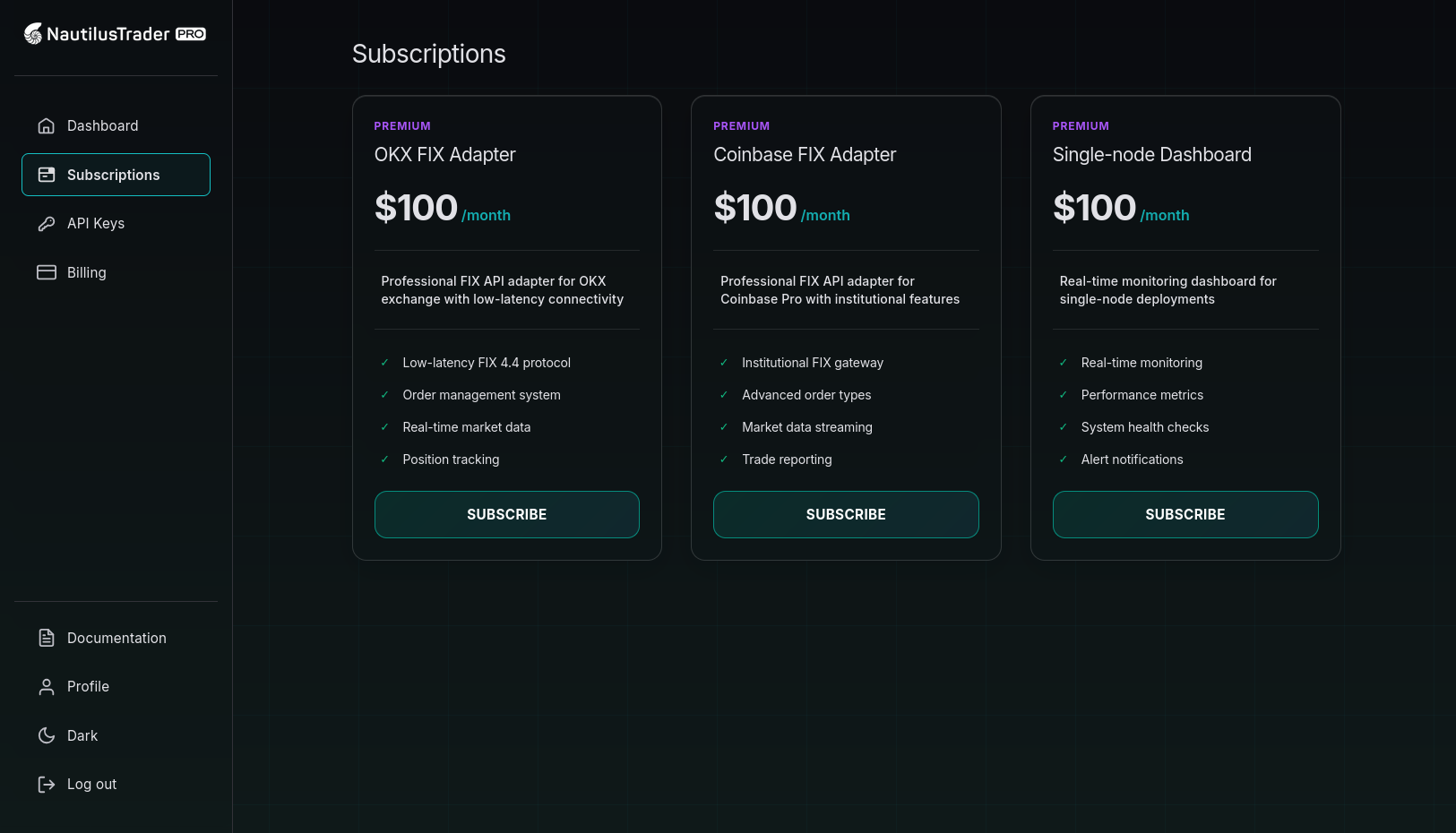
View available products, manage active subscriptions, and handle billing. Purchase new subscriptions, upgrade existing plans, or cancel as needed.
Available products
Product catalog
The subscription page displays all available products with:
- Product Name - Name of the subscription plan
- Description - Key features and benefits
- Pricing - Monthly or annual pricing information
- Features List - Detailed breakdown of what's included
- Subscribe Button - Quick purchase access
Product types
Common subscription types may include:
- Basic Plan - Essential features for getting started
- Pro Plan - Advanced features for power users
- Enterprise Plan - Full feature set for organizations
Purchasing a subscription
Subscribe to a product
- Review the available products on the subscription page
- Click Subscribe on your desired product
- Review the subscription details in the checkout modal
- Confirm your payment method (or add a new one if needed)
- Click Subscribe Now to complete the purchase
Payment requirements
Before subscribing, ensure you have:
- A valid payment method in your billing settings
- Sufficient funds or credit limit
- Completed account verification if required
Confirmation process
After successful purchase:
- A confirmation message appears
- Your dashboard updates to show the active subscription
- The system generates an invoice and sends it to your email
- Access to subscription features activates immediately
Managing active subscriptions
Subscription overview
Your active subscriptions are displayed with:
- Product Name - Which plan you're subscribed to
- Status - Active, cancelled, or pending
- Next Billing Date - When your next payment is due
- Actions - Manage or cancel options
Subscription status types
- Active - Subscription is current and services are available
- Cancelled - Subscription is cancelled but remains active until the end of the billing period
- Past Due - Payment failed; service may be suspended
- Expired - Subscription has ended and services are no longer available
Billing cycle
Billing frequency
Subscriptions typically bill:
- Monthly - Charged every month on the same date
- Annual - Charged once per year (often with a discount)
Billing date
- Your first charge occurs immediately upon subscription
- Subsequent charges happen on the same day each billing period
- You'll receive email notifications before each billing cycle
Prorated billing
When upgrading or changing plans:
- You'll be charged the difference for the current period
- The new billing amount takes effect on your next billing cycle
- Downgrades typically take effect at the next billing cycle
Subscription management
Upgrading your plan
To upgrade to a higher-tier plan:
- Go to the subscriptions page
- Find your current subscription
- Click Upgrade or select a new plan
- Review the changes and pricing
- Confirm the upgrade
Cancelling a subscription
To cancel your subscription:
- Find your active subscription
- Click Cancel or Manage
- Select Cancel Subscription from the options
- Confirm the cancellation in the dialog
Important Notes:
- Cancelled subscriptions remain active until the end of the current billing period
- You'll continue to have access to features until the subscription expires
- No refunds are typically provided for partial billing periods
- You can resubscribe at any time
Pausing a subscription
If available, you may be able to pause your subscription:
- Access is suspended during the pause period
- Billing is paused until you resume
- You can resume at any time from your subscriptions page
Payment and invoicing
Payment methods
Subscriptions use your default payment method from your billing settings:
- Ensure your payment method is up to date
- Update payment methods in the Billing section
- Set a default payment method to avoid payment failures
Invoice generation
For each subscription charge:
- The system automatically generates an invoice
- Invoices go to your registered email address
- You can view and download invoices from the Billing > Invoices section
- Invoices include subscription details and billing period information
Subscription features
Access control
Active subscriptions provide:
- Immediate access to plan features
- API usage according to plan limits
- Support level as specified in the plan
- Any additional services included
Usage monitoring
If your plan includes usage limits:
- Monitor usage through your dashboard
- Receive notifications as you approach limits
- Automatic billing for overages (if applicable)
- Upgrade prompts when limits are reached
Troubleshooting
Common issues
Payment Failed
- Check that your payment method is valid and has sufficient funds
- Update your payment method in billing settings
- Contact your bank if the payment was declined
- Retry the payment or contact support
Subscription Not Active
- Wait a few minutes for activation to complete
- Refresh your dashboard
- Check for any payment issues
- Contact support if the problem persists
Cannot Cancel Subscription
- Ensure you're logged into the correct account
- Try using a different browser or clearing cache
- Contact support for assistance with cancellation
Billing Date Confusion
- Check your first invoice for the original billing date
- Billing occurs on the same date each month/year
- Account for months with different numbers of days
- Contact support for billing date questions
Getting help
For subscription issues:
- Check your email for any billing notifications
- Review your payment method status
- Contact support at support@nautilustrader.io
- Include your subscription details when contacting support
Best practices
Managing your subscription
- Keep your payment methods up to date
- Monitor your usage if applicable
- Review invoices for accuracy
- Cancel before the next billing cycle if needed
- Consider annual billing for cost savings
Account security
- Protect your account credentials
- Enable two-factor authentication
- Monitor subscription activity regularly
- Report any unauthorized charges immediately
The subscription system provides flexible access to NautilusTrader Pro services with transparent billing and easy management.